
The moment you give an autonomous agent raw access to your database via standard SQL drivers, you risk prompt injection attacks, accidental drop commands, unmonitored connections, and context context-window bloat from dumping entire schemas into prompts.
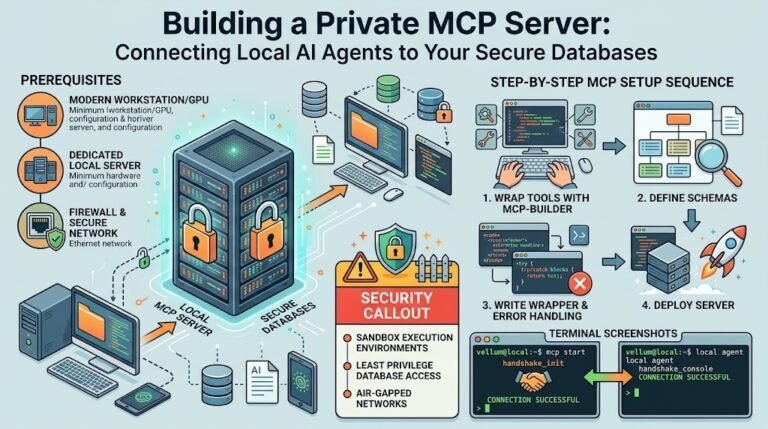
Anthropic’s Model Context Protocol (MCP) eliminates this chaos. MCP acts as an open, standardized API bridge between your AI models and isolated local data sources. Think of it as a secure USB-C standard, but for linking local LLMs to PostgreSQL, SQLite, or MySQL databases.
This guide walks you through building, configuring, and securing a local MCP server that lets AI agents query your databases safely without compromising system integrity.
Why MCP Outperforms Traditional Database Tool-Calling
Before MCP, connecting an AI agent to a local database required custom tool wrappers, manual schema formatting, and bespoke authentication logic for every single project.
OLD WAY (Custom Glue Code):
[LLM Agent] ---> [Custom Python Wrapper] ---> [Database Driver] ---> [Local DB]
(Requires manual error handling, custom schema prompt injection, no unified standard)

MCP WAY (Standardized Architecture):
[LLM Client / Host] <=== JSON-RPC over stdio/SSE ===> [MCP Server] ---> [Local DB]
(Unified protocol, dynamic tool discovery, strict boundary enforcement)
MCP introduces three fundamental improvements for systems administrators and AI engineers:
- Standardized JSON-RPC Messaging: MCP standardizes how tools, resources, and prompts are exposed. Your database logic stays completely independent of whether you use Claude Desktop, Cursor, or custom local execution frameworks.
- Dynamic Resource & Tool Discovery: Instead of hardcoding SQL schemas into your system prompts, the agent queries the MCP server at runtime to discover available tables, read-only resources, and controlled execution tools.
- Strict Security Boundaries: The MCP server executes as an isolated middleware process. It runs locally, filters query inputs via parameterized interfaces, and prevents runaway AI agents from executing destructive database calls.
Architecture: How an MCP Database Bridge Operates
Understanding the component flow prevents unexpected connection leaks or state corruption:
- MCP Client (Host): The frontend application or agent orchestration framework (e.g., Claude Desktop, Cursor, or a local Node.js script) that manages the user session and LLM prompt loop.
- MCP Server: A lightweight server executable (written in TypeScript or Python) that exposes tools like
read_queryordescribe_schemaover standard input/output (stdio) or Server-Sent Events (SSE). - Local Database: The target datastore (such as PostgreSQL or SQLite) running on localhost or inside a Docker container.
Step-by-Step Guide: Building a Secure PostgreSQL MCP Server
Let’s build a production-grade TypeScript MCP server that exposes read-only access to a local PostgreSQL instance.
Step 1: Initialize the Project Environment
Set up your workspace and install the official Model Context Protocol SDK alongside PostgreSQL client libraries and Zod for schema validation.
mkdir mcp-postgres-server
cd mcp-postgres-server
npm init -y
npm install @modelcontextprotocol/sdk pg zod dotenv
npm install --save-dev typescript @types/node @types/pg tsx
npx tsc --init
Step 2: Construct the MCP Server Core
Create an index.ts file. We will define a server that exposes two capabilities: schema inspection and read-only parameterized query execution.
import { Server } from "@modelcontextprotocol/sdk/server/index.js";
import { StdioServerTransport } from "@modelcontextprotocol/sdk/server/stdio.js";
import { CallToolRequestSchema, ListToolsRequestSchema } from "@modelcontextprotocol/sdk/types.js";
import pg from "pg";
import { z } from "zod";

const { Pool } = pg;

// Initialize isolated local PostgreSQL pool using read-only credentials
const dbPool = new Pool({
  host: process.env.DB_HOST || "localhost",
  port: parseInt(process.env.DB_PORT || "5432"),
  database: process.env.DB_NAME || "app_db",
  user: process.env.DB_USER || "agent_readonly",
  password: process.env.DB_PASSWORD || "secure_local_password",
  max: 5, // Restrict connection spikes from automated loops
});

const server = new Server(
  { name: "postgres-mcp-bridge", version: "1.0.0" },
  { capabilities: { tools: {} } }
);

// Register available tools for the AI agent
server.setRequestHandler(ListToolsRequestSchema, async () => {
  return {
    tools: [
      {
        name: "get_database_schema",
        description: "Retrieves the table names, column structures, and data types from the local database.",
        inputSchema: { type: "object", properties: {} },
      },
      {
        name: "execute_read_query",
        description: "Executes a SELECT query against the local database to retrieve records.",
        inputSchema: {
          type: "object",
          properties: {
            sql_query: {
              type: "string",
              description: "A valid SQL SELECT statement. Multi-statement or write operations are forbidden.",
            },
          },
          required: ["sql_query"],
        },
      },
    ],
  };
});

// Enforce query safety rules before execution
server.setRequestHandler(CallToolRequestSchema, async (request) => {
  const { name, arguments: args } = request.params;

  if (name === "get_database_schema") {
    const schemaQuery = `
      SELECT table_name, column_name, data_type
      FROM information_schema.columns
      WHERE table_schema = 'public'
      ORDER BY table_name;
    `;
    const result = await dbPool.query(schemaQuery);
    return { content: [{ type: "text", text: JSON.stringify(result.rows, null, 2) }] };
  }

  if (name === "execute_read_query") {
    const querySchema = z.object({ sql_query: z.string() });
    const { sql_query } = querySchema.parse(args);

    // Guardrail: Explicitly block destructive SQL commands at the middleware layer
    const sanitizedQuery = sql_query.trim().toLowerCase();
    if (!sanitizedQuery.startsWith("select") || sanitizedQuery.includes(";") || sanitizedQuery.includes("drop")) {
      throw new Error("Security Violation: Only single SELECT queries are permitted via MCP.");
    }

    const result = await dbPool.query(sql_query);
    return { content: [{ type: "text", text: JSON.stringify(result.rows, null, 2) }] };
  }

  throw new Error(`Tool not found: ${name}`);
});

async function run() {
  const transport = new StdioServerTransport();
  await server.connect(transport);
  console.error("Postgres MCP Server operational over stdio.");
}

run().catch((err) => console.error("Fatal startup error:", err));
Step 3: Link the Server to Your MCP Client Host
To plug this local database bridge into an agent client like Claude Desktop or Cursor, update your host configuration JSON file (claude_desktop_config.json).
{
  "mcpServers": {
    "local-postgres": {
      "command": "npx",
      "args": ["tsx", "/absolute/path/to/mcp-postgres-server/index.ts"],
      "env": {
        "DB_HOST": "127.0.0.1",
        "DB_PORT": "5432",
        "DB_NAME": "analytics_dev",
        "DB_USER": "agent_readonly",
        "DB_PASSWORD": "secure_local_password"
      }
    }
  }
}
Once saved, restart your MCP host application. The client immediately detects the local-postgres server, queries its registered tools, and allows the agent to inspect table schemas and pull data on demand.
Pro-Tip & Troubleshooting: The Token-Exhaustion Database Trap
A frequent disaster when connecting agents to local databases is the Unbounded Result Payload.
An agent executes a seemingly harmless query like SELECT * FROM system_logs on a local database with 500,000 records. The MCP server processes the query, converts the massive output to JSON, and passes it directly back to the client. This floods the LLM context window instantly, crashing your session or costing a small fortune in API usage.
// FIX: Enforce hard limit constraints inside your MCP tool handler
if (name === "execute_read_query") {
  let { sql_query } = querySchema.parse(args);

  // Strip existing trailing semicolons
  sql_query = sql_query.trim().replace(/;$/, "");

  // Append mandatory LIMIT clause if missing
  if (!sql_query.toLowerCase().includes("limit")) {
    sql_query += " LIMIT 100";
  }

  const result = await dbPool.query(sql_query);
  return { content: [{ type: "text", text: JSON.stringify(result.rows, null, 2) }] };
}
SysAdmin Rule: Never trust the LLM to format its own database limits. Enforce strict array slice bounds, connection timeout limits (e.g.,
statement_timeout = 3000ms), and query response truncations directly inside your MCP server logic.
Summary & Next Steps
Model Context Protocol solves the mess of integrating AI agents with local datastores. It establishes clean boundaries, decouples database logic from specific AI models, and keeps your system safe from unconstrained model executions.
To roll this out in your environment:
- Provision a dedicated PostgreSQL or SQLite database user with strict read-only permissions (
GRANT SELECT ON ALL TABLES IN SCHEMA public TO agent_readonly;). - Build your lightweight TypeScript or Python MCP bridge following the schema-and-query validation pattern detailed above.
- Set strict token and execution limits inside the middleware layer to prevent runaway query loads.